
How I Optimized 40 WordPress Posts to Perfect SEO Scores Using Gemini CLI SEO audit
Why Gemini CLI SEO audit? In the world of digital publishing, consistency is the ultimate challenge. As a blog grows, older posts often fall behind modern SEO standards, resulting in a site that is only partially optimized. Recently, I faced this exact problem on tskamath.com with 40 published posts ranging from “perfect” to “critically undersized.” Manually fixing each one would have taken days of tedious work in the WordPress dashboard. Instead, I used Gemini CLI paired with the Novamira-mcp (WordPress connector) and specialized subagents to audit and fix the entire site in a single interactive session. Here is how I did it.
Step 1: Enabling Subagents in Gemini CLI SEO audit
The secret sauce to this project was delegation. Gemini CLI is powerful on its own, but its true potential is unlocked when you enable “subagents”—specialized AI workers that can handle parallel tasks. To get started, I had to enable the experimental features in my global settings. If you want to follow along, you will need to edit your settings.json file located at C:Users[username].geminisettings.json and add the following block:
{
  "experimental": {
    "skills": true,
    "agent": true
  }
}
This configuration allows the main Gemini agent to spawn “generalist” subagents, which are perfect for batch processing. This setup is similar to how I managed my self-hosted VPS multi-domain support, where efficiency and automation are key.
Step 2: Running the Full Site Audit
Once the environment was ready, I used the tskamath-auditor skill to scan the site. This skill uses PHP scripts via the MCP to check six critical SEO metrics: Title/Slug consistency, Meta Description presence, H1/H2 heading hierarchy, Image Alt tags, Internal Link counts (minimum 2), and Content Length (minimum 600 words).
I triggered the audit with this specific prompt:
“Use the tskamath-auditor skill to run a full SEO and content audit on all published posts on tskamath.com. Use subagents to process posts in parallel batches for speed. For each post, check: title, meta description, slug, headings (H1/H2), image alt tags, internal links, content length, and keyword focus. Score each post out of 6. Present results in a markdown table sorted by score (worst first).”
The result was a comprehensive table showing that while many posts were 5/6, several older tutorials were as low as 1/6, missing almost every modern SEO requirement.
Step 3: Fixing Critical Posts (1-2/6)
Posts with scores of 1/6 or 2/6 needed “surgical” intervention. These were typically older posts like 3639 (AI-Generated Images) or 3449 (Blocksy Theme Setup) that were either too short or completely lacked metadata. For these, I handled them one-by-one to ensure high-quality content expansion.
I instructed Gemini to perform a deep overhaul: writing compelling 155-character meta descriptions, setting focus keywords in Rank Math, converting H3s to H2s for better hierarchy, and expanding the text naturally to exceed 600 words. For instance, my Blocksy theme setup post was expanded from 246 words to over 600 by adding sections on typography, color choices, and performance tips.
Step 4: Bulk Internal Linking Pass
The most common deficiency was a lack of internal links. 11 different posts had a score of 5/6 purely because they didn’t link to other tskamath.com content. Fixing this manually would involve opening 11 tabs, finding relevant posts, and pasting URLs—a huge time sink.
Instead, I provided the subagents with a mapping of all 11 post IDs and their topics. I asked Gemini to identify contextually relevant targets for each and insert them naturally into the existing paragraphs. In seconds, all 11 posts were updated in parallel, resolving the “Internal Link” error site-wide.
Step 5: Surgical Fixes (5/6 Posts)
Some posts were “almost perfect” but failed on a single technicality. For example, the Ganesha Yantra tutorial was at 599 words—exactly one word short of the threshold! Others were simply missing an alt tag on a single image. These “surgical fixes” were handled by the subagents by fetching the specific post content and adding the missing piece (a closing paragraph or an image attribute) without changing the rest of the text.
Step 6: Final Bulk Fix (3-4/6 Posts)
The final phase involved 8 posts that needed a mix of meta descriptions, focus keywords, and minor expansion. By this point, I had complete trust in the subagent workflow. I provided a detailed list of instructions for all 8 posts in a single prompt. The subagents divided the work, executed the PHP updates via the MCP, and reported back with 100% success.
Results
The outcome was a total transformation of the site’s SEO profile:
- 40/40 posts now sit at a perfect 6/6 SEO score.
- 26 posts were actively modified and fixed in a single session.
- Every post now has a custom Rank Math meta description and focus keyword.
- Internal linking is now a cohesive web rather than isolated islands.
Key Takeaways
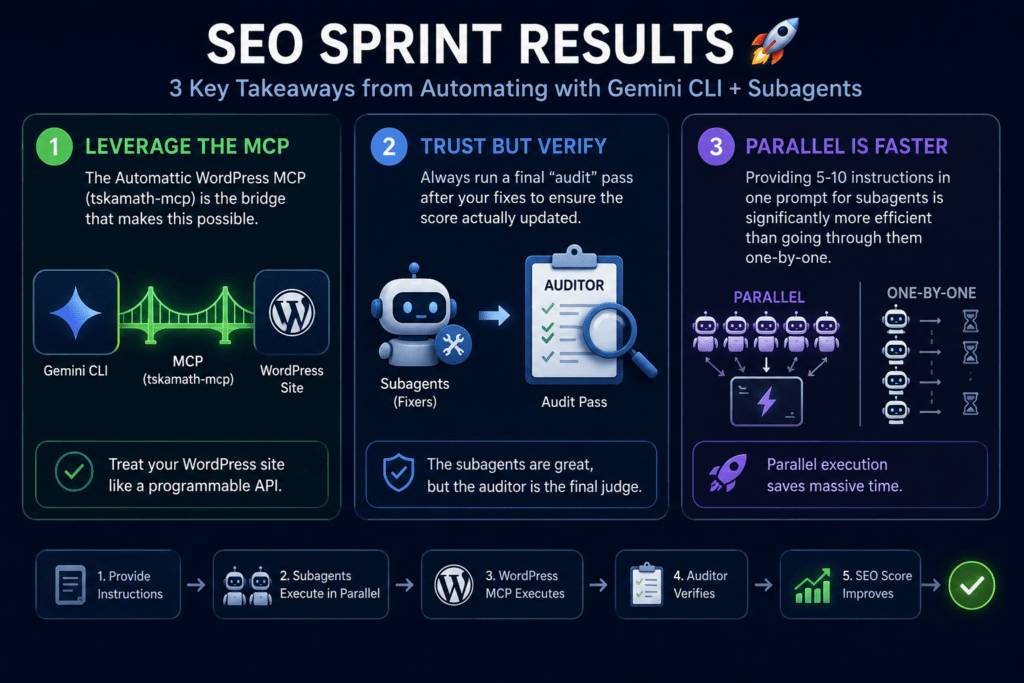
Using Gemini CLI with subagents is not just about saving time; it’s about maintaining a standard of quality that is impossible to manage manually at scale. Here are the three most important lessons I learned from this Gemini CLI SEO audit sprint:
- Leverage the MCP: The Automattic WordPress MCP (tskamath-mcp) is the bridge that makes this possible. It treats your WordPress site like a programmable API.
- Trust but Verify: Always run a final “audit” pass after your fixes to ensure the score actually updated. The subagents are great, but the auditor is the final judge.
- Parallel is Faster: Providing 5-10 instructions in one prompt for subagents is significantly more efficient than going through them one-by-one.
If you are looking to scale your content operations or fix a backlog of technical debt on your blog, Gemini CLI is the ultimate power tool. For more on optimizing your workflow, don’t miss my guide on robust automation in n8n.