Mastering Google AI Studio for Website Development: A Professional Guide
If you think Google AI Studio is just a sandbox for testing prompts, you are missing out on one of the most powerful code-generation engines available today. While many developers use it to “talk” to Gemini, the real power lies in Google AI Studio website development. It has shifted from a mere playground to a sophisticated tool capable of scaffolding entire React or Next.js applications in minutes.
In this guide, I will walk you through how I use Google AI Studio to accelerate web development, identify the technical “blind spots” that most tutorials ignore, and show you how to move from a prompt to a live, production-ready website with automated deployment.
Why Google AI Studio is a Game-Changer for Web Dev
Most AI website builders are “black boxes”—you give them a prompt, and they give you a static page you can barely customize. Google AI Studio is different. It provides you with the raw React or Angular code, allowing you to own the stack. When you leverage Google AI Studio website development workflows, you are essentially hiring a senior developer to write your boilerplate, state management, and component architecture.
Step 1: Choosing the Right Model and Framework
Before you type a single prompt, you need to configure your environment. In AI Studio, you generally have two choices for the heavy lifting: Gemini 1.5 Pro and Gemini 1.5 Flash.
- Gemini 1.5 Pro: Use this for complex logic, multi-step state management, and deep architectural planning. It has a massive context window, perfect for feeding in existing documentation or large codebases.
- Gemini 1.5 Flash: Use this for fast UI iterations and simple landing pages. It is incredibly quick and cost-effective.
Pro Tip: Always set your template to React or Next.js in the settings. These are the most flexible frameworks for modern web apps and integrate perfectly with Vercel or Netlify for deployment.
Step 2: Prompting for a Full-Stack Architecture
The biggest content gap in most tutorials is the lack of “structure” in prompts. Don’t just ask for a “roofing website.” Instead, use a Structured Architectural Prompt. Tell the AI precisely what you need:
“Act as a Senior Full-Stack Developer. Generate a Next.js application using Tailwind CSS. I need a responsive landing page, an internal Dashboard for lead management, and a Pricing page. Use Lucide-React for icons and ensure all state is managed via React Context.”
By defining the stack and the state management, you prevent the AI from giving you “spaghetti code.”
Step 3: The Critical API Layer (Don’t Leak Your Keys!)
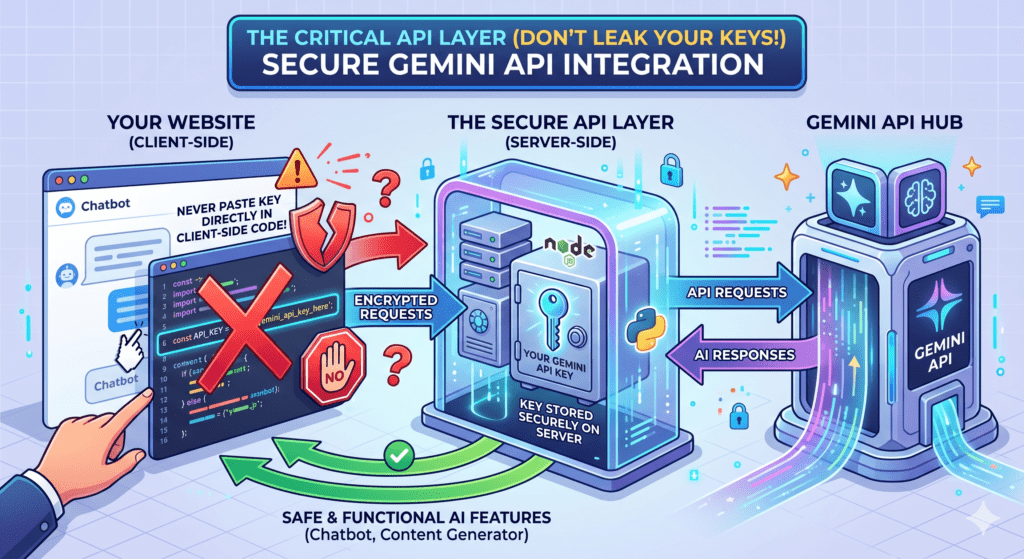
If you want your website to actually *use* AI (like a chatbot or an automated content generator), you need to integrate the Gemini API. Most beginner guides suggest pasting your API key directly into the client-side code. Never do this.
For secure Google AI Studio website development, you must route your AI calls through a backend (like Next.js API routes). This ensures your API keys are stored as Environment Variables on your server and are never visible to the user’s browser. For a deeper look at secure workflows, check out our guide on Safe AI Workflows.
Step 4: Continuous Deployment via GitHub
One of the slickest features in the modern AI workflow is the ability to sync your AI Studio project with GitHub. Once you have generated your code:
- Connect your GitHub account in AI Studio settings.
- Create a new repository directly from the interface.
- Push your changes.
Now, every time you “update” your prompt in AI Studio and commit the changes, your website will automatically rebuild and redeploy on hosts like Vercel or Hostinger. It is Continuous Development powered by AI.
Step 5: Managing Quotas and Rate Limits
When building for production, you must account for Google’s API quotas. If your website starts getting thousands of hits, a “Free Tier” API key will hit rate limits instantly. You need to implement Exponential Backoff and Error Handling to ensure your site doesn’t crash when the API is busy. Mastering Error Handling is a skill that translates across all automation platforms.
Key Takeaways
- Control the Stack: Choose React/Next.js for the best scalability.
- Prompt Architecture: Define your state management and components upfront.
- Security First: Keep your Gemini API keys in the backend.
- Sync for Speed: Use the GitHub integration for automated deployments.
Google AI Studio has democratized web development, but only if you use it with a professional mindset. Stop building simple pages and start building AI-integrated systems that scale.